Share your screen, not your inbox.
Inkout is a free Chrome extension that blurs email addresses, phone numbers, card numbers and API keys on every website, so they never reach the people on your call.
Free, no account, nothing collected.
- ANArjun
- MIMeera
- KMKabir
What it hides
Everything is on from the first page you open. Each type can be switched off in settings.
| Type | For example | On your shared screen |
|---|---|---|
| Email addresses | priya.sharma@example.com | priya.sharma@example.com |
| Phone numbers, any country | +91 98765 43210 | +91 98765 43210 |
| Card numbers | 4111 1111 1111 1111 | 4111 1111 1111 1111 |
| API keys and tokens | ghp_8Hk2Qz7WmN4xT1… | ghp_8Hk2Qz7WmN4xT1 |
| Bank account numbers (IBAN) | DE89 3704 0044 0532 0130 00 | DE89 3704 0044 0532 0130 00 |
| Your own words | Project Falcon | Project Falcon |
| IP addresses (off unless you turn it on) | 192.168.1.24 | 192.168.1.24 |
It also covers text you type into forms, tab titles, embedded frames and web components, and keeps hidden text hidden when you select it.
It notices when you start presenting
When a tab starts sharing your screen in Meet, Teams, Zoom or another meeting site on the web, Inkout switches protection on if it was off, and ends any pause you forgot about.
Something unexpected on screen? Alt Shift K blurs the whole page at once. Press it again to bring it back.
The toolbar button shows how much is hidden on the tab you're on, and a badge tells you if protection is off or paused before you share.
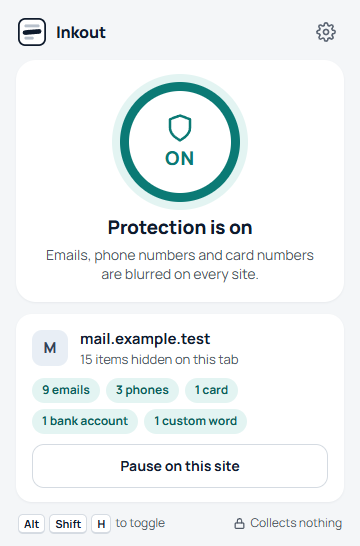
Set it up once
- Add it to Chrome. It's on straight away, on every site.
- Pin it to the toolbar. You'll see at a glance whether it's on.
- Share as usual. Inkout does the rest, call after call.
Nothing you see leaves your device.
- No account to create.
- No analytics, tracking or ads.
- No page content is sent anywhere. Inkout makes no network requests at all.
The code is open for anyone to check. Read the privacy policy
Questions
Does it work with the Zoom or Teams desktop apps?
Inkout hides text inside Chrome, so anything you show from a Chrome tab is covered, whatever app runs the call. It can only notice a share that starts from a web page; if you share from a desktop app, turn Inkout on first (it's on by default).
Will it break the websites I use?
No. Inkout paints over the matching text without changing the page itself, so sites like web mail keep working normally.
What can't it hide?
Chrome's own interface (the address bar and autofill suggestions), text inside images, canvas drawings and PDFs, and a value split across two pieces of a page.
Is it really free?
Yes. Inkout is free and open source under the MIT license. There's no paid version.